Lompat ke konten utama

Fakultas Ilmu Sosial & Ilmu Politik
  1. Home
  2. /
  3. International
  4. /
  5. Admissions (How To Apply)

More detailed information can be accessed via the following Padjadjaran University website:

https://admission.unpad.ac.id/international-student

Bachelor Programs

  • Achievement-based National Selection to enter state universities (SNBP). Selection is conducted by reviewing the academic achievements, non-academic achievements, and/or portfolios of prospective students.
  • Test-based National Selection to enter state universities (SNBT). Prospective students who cannot pass through the first route can choose to take this SNBT route. This test consists of two tests, namely: (1) a scholastic aptitude test, which includes an assessment of cognitive abilities; and (2) academic potential, which includes an assessment of other abilities of prospective students
  • Universitas Padjadjaran Entrance Test (SMUP). Prospective students can also choose to take an independent test offered by an individual university. Prospective students who are eligible to take the test are those who graduate from high school in that respective year or a maximum of two years before. Prospective students can use SNBT scores or take other scholastic aptitude tests conducted by Unpad. Additionally, prospective students can also apply through the achievement track for those who have national/international achievements in the fields of science, sports, and arts that are recognised by the Ministry of Education, Culture, Research, and Technology.

Participants in the SMUP Independent Selection – SMUP 2025 Exam can register by following the following conditions:

  • All high school/MA/vocational school graduates from 2023, 2024, and 2025 or package C students with a maximum age of 22 years as of July 1, 2025.
  • SMUP 2025 participants may register through multiple admission pathways and selection schemes.  
  • Participants who have been admitted through the SNBP will not be included in the Unpad independent selection process.  
  • The SMUP Exam will be conducted online.

Requirements for SMUP Applicants for Academic Programs (Bachelor’s Degree) under the 2025 SMUP Examination scheme can register by following the following conditions:

  1. Indonesian citizen (WNI).
  2. All high school/MA/vocational school graduates from 2023, 2024, and 2025 or package C students who are no older than 22 years old as of July 1, 2025.
  3. Each participant is allowed to choose a maximum of 4 (four) study programs consisting of 2 (two) choices of Academic Programs (Bachelor’s Degree) and 2 (two) choices of Vocational Programs (Diploma Four/Applied Bachelor’s Degree) with the provisions as stated in the table in the Academic Program (Bachelor’s Degree) and Vocational Program (Applied Bachelor’s Degree).
  4. The sequence of program choices indicates priority.
  5. Admission criteria are based on the highest scores within the program’s capacity (quota).
  6. The registration fee is IDR 300,000. Participants who are later accepted/approved for the KIP-K program will have their registration fees refunded.
  1. Selecting the Selection Pathway. In this section, the applicant will select the selection pathway they choose to follow. Each pathway has different requirements. Make sure the applicant has read and understood all the information on the SMUP page https://smup.unpad.ac.id.
  2. Selecting the Study Program. In this section, the applicant will select a study program. The study programs that can be selected may differ for each selection pathway. The order in which study programs are selected determines the priority of selection results.
  3. Selecting Payment Method & Payment. In this section, the applicants will select a payment method. The available options are Bank Bill Payment and Virtual Account.
  4. Completing Data & Other Requirements (In this section, the applicants’ data and requirements will be checked again according to the selected path. If there is incomplete or incorrect data, please complete the data first before finalizing the data.
    • Complete Profile Data.
    • Complete Education Data.
    • Complete Family Data.
    • Complete Education Cost Data.
    • Complete Certificate Data.
    • Complete Special Requirements Data.
  5. Finalize Registration. If all data is complete and correct, proceed to finalize the registration.

No

Department 

Capacity

1

Public Administration

52

2

International Relations

65

3

Social Welfare 

35

4

Government Science

40

5

Antrophology 

20

6

Business Administration

72

7

Sociology 

25

8

Political Science 

24

9

Business Administration (Pangandaran Campus) 

16

No

Department

Tuition Per Semester ( IDR)

Institutional Development Fee (IPI) (IDR)

1

Public Administration

7,000,000

60,000,000

2

International Relations

7,500,000

70,000,000

3

Social Welfare 

6,000,000

25,000,000

4

Government Science

6,000,000

30,000,000

5

Antrophology 

6,000,000

15,000,000

6

Business Administration

7,000,000

60,000,000

7

Sociology 

6,000,000

15,000,000

8

Political Science 

6,000,000

30,000,000

9

Business Administration (Pangandaran Campus) 

6,000,000

20,000,000


For foreign students


No

Department

Tuition Per Semester ( IDR)

Institutional Development Fee (IPI) (IDR)

1

Public Administration

17,000,000


2

International Relations

27,000,000

75,000,000

3

Social Welfare 

27,000,000


4

Government Science

12,500,000


5

Antrophology 

17,000,000


6

Business Administration

17,000,000

65,000,000

7

Sociology 

15,500,000


8

Political Science 

15,500,000


9

Business Administration (Pangandaran Campus) 

12,000,000

 
  • The announcement of nominations for participants who have passed the Padjadjaran University Entrance Selection (SMUP) Independent Selection scheme, UTBK and Report Cards, as well as the Interest and Talent/Non-Academic Achievement scheme for Academic Programs (Bachelor’s) and Vocational Programs (Applied Bachelor’s), is conducted openly and integrated with the registration process.
  • Announcement details will be communicated and accessible through the registration account https://admission.unpad.ac.id/en closer to the announcement date.

Master Programs

  1. Indonesian citizens or foreign citizens.
  2. Graduated from an accredited bachelor’s degree program from BAN PT/LAM-PTKes.
  3. Participants must have an Academic Ability Test (TKA) and English Language Proficiency Test (TKBI) certificate from an institution recognized by Unpad. There is no minimum score requirement for TKBI and TKA.
  4. Academic Ability Test (TKA) certificate from the Psychology Innovation Center of Padjadjaran University (PIP Unpad) or Academic Potential Test (TPA) from other official institutions recognized by UNPAD, namely PLTI Himpsi, UGM, UNAIR, UI, and BAPPENAS.
  5. English Language Test (ELT) / English Language Proficiency Test (TKBI) certificate from UNPAD that is still valid (maximum 2 years) or an English proficiency test from an official institution recognized by UNPAD, namely:
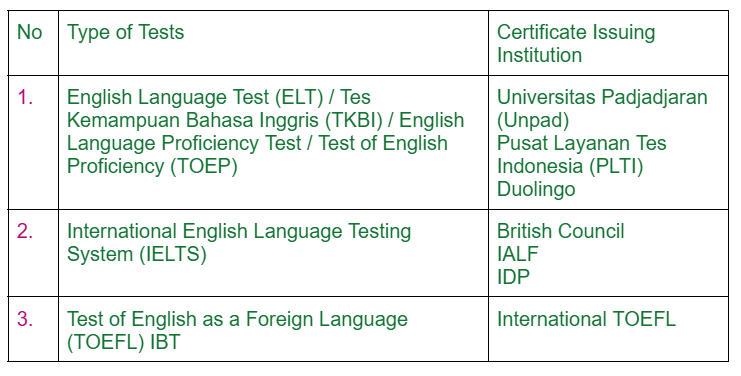
    • Notes: 

      • Applicants who use English language certificates or TOEFL tests from institutions other than those listed above will require a long time (> 1 month) for verification by the official organizing institution, so it is possible that eligible applicants will not be called for interviews in accordance with the selection session/wave in which they registered.
      • Applicants who are not eligible for an interview in one selection session will be included in the next selection session if they have corrected/completed the missing documents without having to pay the registration fee again, if they are still in the same batch.
      • For applicants who have scientific publications in reputable international journals (Q3) according to SJR (Scientific Journal Rankings – SCImago) as the first author, they are not required to upload their TKA/TPA and TKBI scores when registering.
  6. For the Master of Business Administration program, applicants must have at least 2 years of work experience and submit a letter of employment from their current employer, except for applicants to the fast track program. Based on Dean’s Decree Number: 1825/UN6.G/KP/2025 Concerning The Determination of New Student Admission Requirements for The Master of Business Administration Study Programme (S2) in The Faculty Of Social and Political Sciences, Universitas Padjadjaran. 

All documents must be attached or uploaded to the website https://admission.unpad.ac.id/en when registering.

  • For those who are interested in participating in the Online TKA organized by PIP Unpad, please access https://portaltes.pipunpad.id/login. For those who have registered and paid for the Online TKA, please pay attention to the instructions below: Technical Implementation Instructions.
  • For those interested in participating in the TKBI Online organized by the Unpad Language Center, please access the website https://pendaftaran.unpad.ac.id/. For those who have already registered and paid for the TKBI Online, please note the following instructions: Participant Guidelines for TKBI Online SMUP / Quick Guide / User Manual for the TKBI Online SMUP Exam.`

No

Study Program

Concentration

Capacity 

1

Political Science (Applied Field)**

Political Science 

20

2

Political Science (Applied Field)**

International Relations

20

3

Government Science (Applied Field)**

Government Science 

10

4

Public Administration (Applied Field)**

Public Administration 

30

5

Social Welfare*

Social Welfare

20

6

Sociology*

Sociology

20

7

Business Administration*

Business Administration

20

8

Anthropology*

Antrophology 

20

9

Public Policy (Applied Field)**

Public Policy

40

Notes: 

*) Accepts graduates with an Applied Bachelor’s Degree/Diploma 4 (D4)

**) Master’s Degree in Applied Fields and accepts graduates with an Applied Bachelor’s Degree/Diploma 4 (D4)

  1. Check the general and specific requirements for enrolling in your preferred study program.
  2. Visit https://admission.unpad.ac.id/en and log in using your Google account.
  3. Click on the ‘Registration’ menu
  4. Select one of the Education Levels and then press the Select Path button
  5. Select the Padjadjaran University Master’s Degree Admission Selection Path and then click ‘Register’
  6. Kindly fulfill the first step of completing the supporting data (personal information, education, employment, and academic portfolio).
  7. Fill in your personal information:
    • Participant Identity Details
    • Participant ID Card Address Details
    • Participant Domicile/Residence Address Details
    • Participant WhatsApp Contact Number Details
    • Participant Email Address Details
  8. Fill in your education information:  Detail Participant’s Bachelor’s Degree Details, consisting of:
    • Name of University
    • Study Program
    • Year of Enrollment
    • Year of Graduation
    • GPA (Use a period as the decimal separator)
  9. Fill in your work information. Applicant Job Details
  10. Fill in your academic portfolio 
    • If you have scientific publications in reputable Q1 international journals, click ‘Yes’ in the publication question column and fill in the following information:
      • Paper Title
      • DOI
      • Journal Name
      • Year
      • Volume and Number
      • Journal URL
      • Journal Quality URL on scimagojr.com
      • TKA and TKBI documents can be replaced by uploading publications in reputable Q1 international journals according to SJR: Scientific Journal Rankings – SCImago as the first author.
    • If you do not have scientific publications in reputable Q1 international journals, then click ‘No’ in the publication question column and fill in the Academic Ability Test and English Language Proficiency Test details. 
      • Academic Ability Test
        1. Type of Academic Ability Test
        2. Certificate Number
        3. Certificate Date & Validity Period
        4. Academic Ability Test Score
        5. Participate in TKA/TPA
      • English Proficiency Test
        1. Type of English Proficiency Test
        2. Certificate Number
        3. Certificate Date & Validity Period
        4. English Test Score
  11. If all boxes are green, click the next button (step 2) and select the preferred study program, then click save.
  12. Click Special Requirements, and complete the Special Requirements for Master’s Program Selection. Statement of Purpose* Statement of Purpose in Indonesian or English containing the following:
    • Introduce yourself, your interests, and motivations
    • Summarize your undergraduate and previous graduate career
    • Discuss the relevance of your recent and current activities
    • Elaborate on your academic interests
    • Once you’re done, click Save.
  13. Click the next button (step 3) and pay the registration fee of Rp600,000 (six hundred thousand rupiah) to the bank designated by Unpad. 
  14. Once you have completed payment, please click Next (Step 4), double-check all the data you have entered, and finalize your registration. Please wait for the verification process, which will be carried out during the registration period and several days after the registration closes. The Edit Registration Document button will be active if there are invalid documents. If the button is active, please immediately re-upload the documents that are considered invalid with documents that meet the requirements.
  15. The exam/interview is only for participants who have completed the registration process, fulfilled all requirements, and have been deemed eligible. Eligible participants will be contacted by the Faculty at least one day before the exam/interview period.

In determining which students will be accepted, the selection committee will consider the following:

  1. Previous academic performance.
  2. Academic Ability Test and English Language Proficiency Test scores.
  3. Motivation and academic potential as demonstrated in the Statement of Purpose and interview results.

Documents uploaded and data submitted by applicants will be verified by the Selection Committee.

Tuition Fees for Master’s Degree (S2) Students in accordance with the Decree of the Rector of Universitas Padjadjaran Number: 112/UN6.RKT/Kep/HK/2025

No

Study Program

Tuition Per Semester ( IDR)

Institutional Development Fee (IPI) (IDR)

1

Sociology

Regular/Project-Based/RPL/Applied/Executive

10,500,000


2

Public Policy

Regular/Project-Based/RPL/Applied/Executive

10,500,000


3

Business Administration

Regular/Project-Based/RPL/Applied/Executive

10,500,000


4

Public Administration

Regular/Project-Based/RPL/Applied/Executive

10,500,000


5

Political Science 

Regular/Project-Based/RPL/Applied/Executive

10,500,000


6

Antrophology 

Regular/Project-Based/RPL/Applied/Executive

10,500,000


7

Social Welfare

Regular/Project-Based/RPL/Applied/Executive

10,500,000


8

Government Science 

Regular/Project-Based/RPL/Applied/Executive

10,500,000


For foreign students


No

Study Program

Tuition Per Semester ( IDR)

Institutional Development Fee (IPI) (IDR)

1

Business Administration

25,000,000


2

Public Administration

25,000,000


3

Political Science 

25,000,000


Eligible participants will be contacted by the Faculty/Study Program via telephone, WhatsApp, or email. Please ensure that all contact details are active.

  • The Letter of Acceptance (LoA) will only be issued to participants who have passed the SMUP.
  • For participants who need an early graduation decision due to LoA requirements or other reasons, please immediately complete your registration data with valid documents so that you will be included as an eligible participant in the early graduation decision.
  • For participants who have been declared eligible for SMUP and require a Letter of Acceptance (LoA), please send your request via email to: [email protected]

Doctoral Programs

  1. Indonesian citizens or foreign citizens.
  2. Graduated from bachelor’s and master’s programs accredited by BAN PT/LAM-PTKes.
  3. Must have a valid Academic Ability Test (TKA) certificate from the Padjadajaran University Psychology Innovation Center (PIP Unpad) with a minimum score of 500, or an Academic Potential Test (TPA) certificate from other official institutions recognized by UNPAD, namely: PLTI Himpsi; UGM; UNAIR; UI; BAPPENAS.
  4. Good proficiency in English, as indicated by the score of the English Language Proficiency Certificate from the English Language Test (ELT) / English Language Proficiency Test (TKBI) UNPAD that is still valid (maximum 2 years) or an English proficiency test from an official institution recognized by UNPAD, namely:
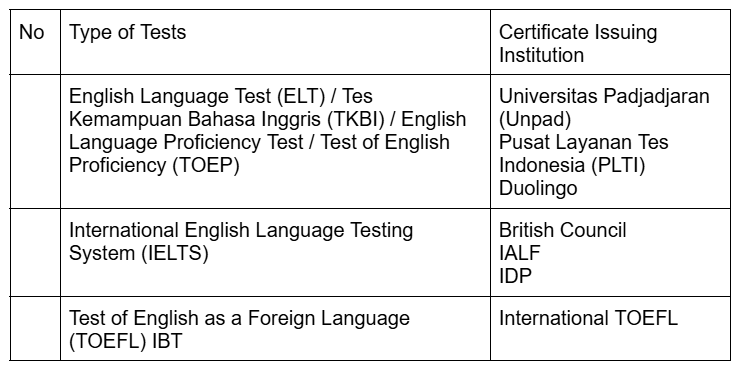
    • Notes: 

      • Applicants who use English language certificates or TOEFL tests from institutions other than those listed above will require a long time (> 1 month) for verification by the official organizing institution, so it is possible that eligible applicants will not be called for interviews in accordance with the selection session/wave in which they registered.
      • Applicants who are not eligible for an interview in one selection session will be included in the next selection session if they have corrected/completed the missing documents without having to pay the registration fee again, if they are still in the same batch.
      • For applicants who have scientific publications in reputable international journals (Q3) according to SJR (Scientific Journal Rankings – SCImago) as the first author, they are not required to upload their TKA/TPA and TKBI scores when registering.
  5. Have a Letter of Intent to Supervise from the prospective Promoter Chair;
  6. Have two (2) Letters of Recommendation;
  7. Have a Statement of Purpose;

All documents must be attached or uploaded to the website https://admission.unpad.ac.id/en when registering.

  • For those who are interested in participating in the Online TKA organized by PIP Unpad, please access https://portaltes.pipunpad.id/login. For those who have registered and paid for the Online TKA, please pay attention to the instructions below: Technical Implementation Instructions.
  • For those interested in participating in the TKBI Online organized by the Unpad Language Center, please access the website https://pendaftaran.unpad.ac.id/. For those who have already registered and paid for the TKBI Online, please note the following instructions: Participant Guidelines for TKBI Online SMUP / Quick Guide / User Manual for the TKBI Online SMUP Exam.

No

Study Program

Concentration

Capacity 

1

International Relations

International Relations

20

2

International Relations

Political Science

20

3

Administration

Public Administration

30

4

Administration

Business Administration

20

5

Administration

Government Science

10

6

Social Welfare

Social Welfare

20

7

Sociology

Sociology

20

8

Sociology

Antrophology 

20

Notes: 

*) Accepts graduates with an Applied Bachelor’s Degree/Diploma 4 (D4)

  1. Check the general and specific requirements for enrolling in your preferred study program.
  2. Mendaftar dan mengisi data secara online di laman https://admission.unpad.ac.id/en  dengan cara mengsi informasi sebagai berikut:
  3. Upload the original documents as follows:
    • Bachelor’s and Master’s degree certificates
    • Bachelor’s and Master’s degree transcripts
    • Academic Ability Test (TKA) certificate from the Psychology Innovation Center of Padjadjaran University (PIP Unpad) or Academic Potential Test (TPA) from other official institutions recognized by UNPAD, namely PLTI Himpsi, UGM, UNAIR, UI, and BAPPENAS. If you want to participate in the Online TKA organized by PIP Unpad, please visit http://pip.unpad.ac.id/announcement/Tes-Kemampuan-Akademik-TKA
    • If you register to take the TKA exam at PIP Universitas Padjadjaran, please note the following instructions: Information on the procedures and schedule for the Academic Ability Test at the UNPAD Psychology Innovation Center
      • International TOEFL (Internet-Based Test); International English Language Testing System (IELTS) Academic;
      • International English Testing System (IELTS) from institutions such as the British Council, IALF, or IDP.
      • English Language Proficiency Test (TKBI) UNPAD.
      • Test of English Proficiency (TOEP) from the Indonesian Test Service Center (PLTI).
      • If you are planning to take the TKBI Online organized by the Unpad Language Center, please access the page https://pendaftaran.unpad.ac.id/. If you have registered to take the TKBI Online exam at Padjadjaran University and have paid the TKBI Online exam fee, please note the following instructions: TKBI Online SMUP Participant Guidelines/Quick Guide/User Manual for the TKBI Online SMUP Exam.
  4. Statement of Purpose in Indonesian or English containing the following:
    • Introduce yourself, your interests, and motivations. 
    • Summarize your undergraduate and previous graduate career. 
    • Discuss the relevance of your recent and current activities.
    • Elaborate on your academic interests
  5. A recent color photograph with a white background, in size 3×4 cm.
  6. Identity Card
  7. Family Card
  8. The documents uploaded and data entered by applicants will be verified by the selection committee.
  9. Obtaining approval from the candidate promoter by:
    • Applicants search for candidate promoters that match their research theme through the website https://admission.unpad.ac.id/en and access the “Expert Directory” menu.
    • Applicants fill out a submission form to obtain the contact details of potential supervisors.
    • The SMUP committee sends the contact details of potential supervisors to applicants via email or mobile phone number, and also sends notifications and applicant information to potential supervisors.
    • Applicants contact potential supervisors whose research topics match their research plans.
    • Applicants discuss their research topics with potential supervisors through any means of communication.
    • Prospective supervisors evaluate the submitted research proposals and express their willingness to supervise.
  10. After completing all documents, the applicant pays the registration fee to the bank designated by Unpad by printing the invoice number obtained after uploading all documents during online registration in the amount of Rp. 750,000.
  11. Print or save the exam applicant card obtained after making payment on the page https://admission.unpad.ac.id/en.

In determining which students will be accepted, the selection committee will consider the following:

  • Previous academic performance
  • Academic Ability Test and English Language Proficiency Test scores
  • Availability of prospective supervisors
  • Results of interviews with prospective supervisors
  • Motivation and academic potential as demonstrated in the Statement of Purpose

Documents uploaded and data submitted by applicants will be verified by the Selection Committee.


Tuition Fees for Doctoral Program (S3) Students in accordance with the Decree of the Rector of Universitas Padjadjaran Number: 112/UN6.RKT/Kep/HK/2025

No

Study Program

Tuition Per Semester ( IDR)

Institutional Development Fee (IPI) (IDR)


Sociology

Regular/Research-Based

14,500,000


Administrative Science

Regular/Research-Based

14,500,000


International Relations

Regular/Research-Based

14,500,000


Social Welfare

Regular/Research-Based

14,500,000


Eligible participants will be contacted by the Faculty/Study Program via telephone, WhatsApp, or email. Please ensure that all contact details are active.

  • The Letter of Acceptance (LoA) will only be issued to participants who have passed the SMUP.
  • For participants who need an early graduation decision due to LoA requirements or other reasons, please immediately complete your registration data with valid documents so that you will be included as an eligible participant in the early graduation decision.
  • For participants who have been declared eligible for SMUP and require a Letter of Acceptance (LoA), please send your request via email to: [email protected]

Faq

  1. How many types of selection are there in Padjadjaran University Admission Selection? There are three admission selection processes conducted by Padjadjaran University in 2025. The first is an independent selection using the SMUP and UTBK examination schemes, school report cards, and the interests & talents/non-academic achievements scheme. The second is a collaborative selection using the SMUP & UTBK examination schemes and report cards. The third is a selection for the International Class/IUP.
  2. I am a participant in the National Selection Based on Test – UTBK 2025. Can I also take part in the Independent Selection as – SMUP Examination? Yes, you can. This year there are no restrictions on scheme selection. You may register for multiple schemes at once, for example the SMUP Examination scheme and the UTBK & Report Card scheme. However, the Interests & Talents/Non-Academic Achievement scheme is only open to 2025 high school/madrasah aliyah/vocational school graduates or Paket C students who are 22 years old or younger as of 1 July 2025 and who have a 2025 SNBT-UTBK score.
  3. I selected the wrong scheme. Can it be cancelled? Yes, you can cancel it. If you have not yet clicked “Create Bill” for the scheme, click the Cancel Registration button located after you select your study programme. Registration fees that have already been paid are non-refundable.
  4. I don’t have an ID card yet. What can I use to register instead? You can use a Temporary ID Letter or Family Card (Kartu Keluarga).
  5. When filling in the National Selection Based on Test – UTBK – participant number, the column doesn’t have enough space. Try entering your UTBK participant number without the hyphen (-).
  6. My National Selection Based on Test, UTBK, results are not out yet. Can I still register? Yes, you can. During registration, you only need to enter your Participant Number of National Selection Based on Test.
  7. If both parents are deceased, what should I fill in the family data section? Please fill in the details of the guardian who’s responsible for covering your education costs.
  8. There’s a warning message saying “An error has occurred on the server” appears. What should I do? Please try using a different browser and try again periodically.
  9. What are the requirements for choosing a study programme in the Padjadjaran University admission selection? Each participant may choose up to four study programmes: a maximum of two Academic Programmes (Bachelor’s) and two Vocational Programmes (Diploma IV/Applied Bachelor’s), except for the Independent Selection — Interests & Talents/Non-Academic Achievements, which follows its own rules. The order in which you select study programmes indicates your preference priority.
  10. What are the requirements for pass photos? Pass photo measuring 4 cm x 6 cm with a minimum resolution of 200px x 300px (+ 250 dpi) and an aspect ratio of 2:3. Colour photo with a plain white background. JPG/JPEG format. Maximum file size 100 KB. Vertical/portrait orientation. Body and head upright and facing the camera. The photo must be sharp and in focus. No part of the head should be cropped, and the face must not be covered by any ornaments. The head must be centred horizontally (the distance from the head to the left edge should be approximately the same as the distance from the head to the right edge).
  11. For Independent Selection, in the on Interests and Talents/Non-Academic Achievements section, is it possible to submit multiple achievements? No. Each participant may only submit their one best achievement.
  12. My parents are divorced and no longer have any of their contact. What should I fill in for family details? Please fill in the details of the guardian who is responsible for you.
  13. What if my parents don’t have pay slips? Please provide a Proof of Income Letter from your sub-district office (kelurahan/kecamatan) or a bank statement.
  14. How to fill report card grades section? Please fill in the subjects according to the provided Excel template.
  15. How do I fill in the average report card? Use the average of all scores listed on the report card.
  16. If there is no graduation certificate yet, how should the graduation date be filled in? Please fill in the date when you registered on the admission.unpad.ac.id page.
  17. I am unable to fill in my ID card number. Please select your citizenship first. 
  18. How do I fill in the number of dependents? Include father, mother, and the number of dependent children (children over the age of 21 or who are married are not considered dependents).
  1. What happens if a device’s specifications differ from the test requirements? For example, a different operating system or RAM capacity. Using a device with different specifications may cause certain features to malfunction, which can disrupt the test or prevent it from running optimally.
  2. Can online tests be taken on mobile phones? No. The examination application is currently compatible only with laptops (mobile phones and tablets are not supported).
  3. Can online tests be taken on a PC equipped with a webcam?. Yes. If you do not have a laptop, you may use a desktop computer equipped with a functioning webcam.
  4. Can online tests be taken on laptops running iOS/MacOS (Apple)? No, currently the only compatible device for the exam application is a laptop with Windows operating system.
  5. What are the requirements for taking the online test? This online examination uses a CAT (Computer Assisted Test) system. To take the test, participants must use a laptop or desktop computer that meets the following minimum specifications:
    • Hardware Type: Laptop or  desktop computer
    • Operating System: Windows 10 (64-bit)
    • CPU: Intel i3 or equivalent
    • RAM: 4 GB
    • Webcam: Present and functioning properly
    • Free Disk Space: > 10 GB
    • Internet: 10 Mbps with 4 GB data allowance
  1. What if my device does not meet one of the system requirements? For instance, a different operating system or insufficient RAM capacity. Using a device that does not meet the minimum specifications is highly discouraged. There is a significant risk that certain application features will not function correctly, which may lead to disruptions or a suboptimal experience during the examination.
  2. Can the online examination be taken on a mobile phone? No. The examination application is currently only compatible with laptop computers.
  3. Can the online examination be taken using iOS or MacOS? No. The examination application is currently only compatible with laptops running a Windows operating system.
  4. An error message appears: “Webcam cannot be opened.” What should I do? Please verify the following:
    • Ensure your PC/Laptop’s Operating System is Windows.
    • Ensure you are using SafeExamBrowser version 3.9.0.
    • Ensure your laptop has a functioning webcam. You can test this by opening a web browser and navigating to https://id.webcamtests.com/.
    • Important: After testing, you must close the web browser completely. The browser may prevent the Examination Application from accessing the webcam.
  5. My webcam works in other applications, but I still get a “Webcam cannot be opened” error in the exam application. Please re-confirm these two critical requirements:
    • Ensure your Operating System is Windows 10 (64-bit) or a newer version. The application is not compatible with MacOS, Linux, or any other OS.
    • Ensure you are using SafeExamBrowser version 3.9.0 exactly.
  6. My laptop is running Windows and the webcam test was successful, but the webcam still does not activate in the application. Ensure that no other applications (e.g., Zoom, Skype, Microsoft Teams, or a web browser) are running that might be using the webcam. Close all other programs before launching the exam.

    Additionally, you must verify that the SafeExamBrowser version in use is exactly 3.9.0, and not any other version.

    To check your version:

    • Open the Control Panel 
    • Select Programs and Features.
    • Locate and click on the SafeExamBrowser application in the list.
    • The version number will be displayed at the bottom of the window.
  7. The webcam view shows something other than my face (e.g., a different application or image). This indicates another application is controlling your camera. Please ensure that no other webcam software (such as Youcam, Zoom, etc.) is running. Close all such applications. If the issue persists, we recommend temporarily uninstalling the conflicting software.

  8. The questions or answer choices are not appearing. First, click the “Refresh” button located in the bottom right corner of the application. If the content still fails to load, please check your internet connection. Ensure you have a stable, high-quality connection and sufficient data quota.

  9. I cannot log in after capturing my photo. After the system captures your photo, do not click the “Retake” (Ulang) button. Immediately proceed to enter your Examination Participant Number and PIN, then click the “Login” button.

  10. How do I configure the “AplikasiUjianSMUP.seb” file to open with SafeExamBrowser?

    First, Ensure the 1-SafeExamBrowserInstaller3.9.0.exe application is already installed on the laptop. Right-click on the exam application, select Open with then Choose another app. Select Choose an app on your PC

    In Windows (C:) > Program Files, Select the SafeExamBrowser folder. Select the Application folder. Select the SafeExamBrowser.exe application then Open. Click the Always button. Select Choose an app on your PC

    In Windows (C:) > Program Files, Select the SafeExamBrowser folder. Select the Application folder. Select the SafeExamBrowser.exe application then Open. Click the Always button.

  1. Am I allowed to choose my examination date? No. Your examination schedule is fixed according to the date and time printed on your examination card.
  2. Is the online examination conducted at the Unpad campus? No. The online examination is conducted from your respective homes.
  3. What subjects will be covered in the online test? The SMUP examination materials are equivalent to the SNBT examination materials, with the same test duration, and are conducted online.
  4. How long is the examination time? The total examination duration is approximately 195 minutes.
  1. I want to pay the SMUP registration fee. How do I do this? Please access the payment guide on the following page: https://smup.unpad.ac.id/metode-pembayaran-smup/
  2. How do I pay via Bank BCA? Please select Menu > Transfer > Virtual Account > 10510 + [Bill Number].
  3. How do I pay via Bank BRI? Please select Payment Menu > University > Company Code (001) + [Bill Number].

LIVE UNPAD - English Course

The English Course, offered by Padjadjaran University as part of the Joint Preparation Phase / Tahap Persiapan Bersama (TPB), aims to equip students with adequate English proficiency, particularly to achieve sufficient scores in standardized tests such as the TOEFL or equivalent assessments, including the English Language Test (ELT) administered by the University’s Language Center. The course focuses on developing three core skills: Listening Comprehension, Structure and Written Expression, and Reading Comprehension. The course start date is Saturday, February 14, 2026 and the end date is Friday, July 17, 2026. To take the English course, please click the following link https://live.unpad.ac.id/course/view.php?id=49775 

Faq